Home

A wireframe kit for Google Drawings and 5 reasons it beats Omnigraffle and Visio
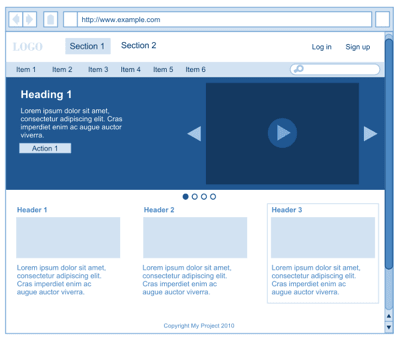

I’ve been playing around with the newest addition to Google Docs, Google Drawings, and I’m quite liking it. I tried drawing a few diagrams and even a wireframe, and it turns out the basic drawing interactions are just as good – in some cases even better – than what I’m used to in Omnigraffle and Fireworks.

5 reasons Google Drawings beats Viso and Omnigraffle

We know the cloud computing arguments, and they certainly apply to wireframes

  1. It’s live. The entire team can work on the same document and see each other’s work instantly
  2. The wireframes live in the cloud, no sending files around, no outdated documents
  3. The risk of losing data is zero. It saves for every edit you make
  4. It’s free
  5. Most people already have a Google account, so no sign up required

We need stencils

One thing was missing though: Stencils. Omnigraffle has stencils coming out of its ears, and Fireworks has some excellent built-in ones. But Google Drawings in its current early and simple form simply doesn’t have it. So I made one.

Leaving the stencils in the gutter

An interesting limitation is the fact that

  • there’s no stencil library function and
  • you can’t easily copy and paste from one document to another.

One solution, it seems, is to clone one of the wireframe kits and thereby also cloning the stencils into each document. To not print or export the stencils, I’ve left them in the gutter area of the document. Seems to work quite okay.

Kind of blue

I’ve been wanting a blue kit since I left a project years ago where we used blue stencils (the idea was Peter‘s). As you may have experienced, some customers simply don’t understand wireframes. The blue color gives that well-known blueprint feel, and shouldn’t prompt questions like “I like it, doesn’t it need a splash of colour?”

The templates

To make it even easier for you (ehm, me) I’ve begun making simple starting point templates.

Main blank template

Product detail page

Landing page

Item list view

They’re all in this shared folder on Google Docs, and it will be updated when there are new templates. If you make one, let me know and I’ll add it to the folder so everyone can use it.

UPDATE: I just added a few wireframe stencils for iPhone

UPDATE: The stencils are now in the Google Docs template gallery:

To read more posts, go back to the front page, or follow me on Twitter. The postings on this site are my own and don’t necessarily represent Vodafone’s positions, strategies, or opinions.


hej

  1. Martin Ferro-Thomsen Says:

    Fantastic! I can easily see this becoming my first choice wireframing tool. Great work and thanks for sharing…

  2. Jeriel Says:

    Thank you!

  3. A wireframe kit for Google Drawings and 4 reasons it beats Omnigraffle and Visio Says:

    [...] full post on Hacker News If you enjoyed this article, please consider sharing it! Tagged with: beats • [...]

  4. Troy Gilbert Says:

    Thanks for the info. But is that really 5 reasons? It’s kinda just one: it’s a webapp. All 5 of those reasons apply to most/all webapps. I was hoping to hear some reasons why the actual task of creating a drawing is better in Google Drawings vs. OmniGraffle vs. Visio.

  5. Free Wireframe Kit for Google Drawings Says:

    [...] Just wrote a blog post describing how he uses it for that purpose, but even more awesomely he’s shared a drawing [...]

  6. Sardar Mohkim Khan Says:

    Great – Thanks for sharing this post adds more reasons why the world should use Google Docs – cheaper, easier, faster and readily shareable

  7. victor Says:

    So how does it compare to another cloud wireframing tool like gomockingbird.com?

  8. Bert Heymans Says:

    This is great! Thank you so much!!

  9. Mikkel Marius Winther Says:

    Friggin amazing! Thank you. I’ve been using OmniGraffle until now but I can’t wait to try wireframing with this.

  10. Dave Goodman Says:

    Wow. Thank you so much for sharing this with everyone. I work in a GoogleApps powered workplace with a number of remote collaboraters, and have started evangelizing GoogleDrawings for a number of key uses: white boarding, design markups.. but I hadn’t thought about how this could help with wireframe collaborations! (just need multipage) Viva la Cloud!

  11. Vinay Mohanty Says:

    great work !

  12. n Says:

    But I’m assuming you can’t create any kind of interaction and therefore present it to your clients as a semi-working model of a site (that allows for naviagtion) … so it’s not really a proper wireframe, but a structural concept.

    So I would argue that this is a replacement for creating structural concepts in photoshop; but is in no way a replacement for omnigraffle or visio …

  13. Régine Lambrecht Says:

    I agree with “n”: it is not easy to customize the “stencils”, so I think it doesn’t replace Visio. It also lack of interactivity, but tw anyway for the good job

  14. Portrætfotografering af Michael Nielsen Says:

    This is great, I have been looking towards Fireworks – But your templates has everything to sketch up a web page without installing Fireworks

  15. A wireframe kit for Google Drawings | Andy McIlwain @ andymci.com Says:

    [...] A wireframe kit for Google Drawings via mortenjust.com [...]

  16. Johnny Says:

    While I do like the idea of Google creating a drawing type of application as apart of their google docs family, I don’t think this will overtake Visio or Omnigraffle anytime soon. Visio and Omnigraffle are just way more robust, comes with stencils/libraries, is way more flexible and has a lot more features such as alignment guides, grid/canvas adjustments and shadows/gradients and that this doesn’t have.

    Also, to your point about it being blue to reflect actual blueprints… having it being black and gray is much better because it takes the color out completely. If you have it blue they will now wonder why everything is blue, especially if there brand colors are blue it can cause a lot of confusion.

  17. Andrew Korf Says:

    Mockflow.com and of course balsamiq.com are both cloud based apps as well. I feel there is huge room for improvement here – curious that Adobe hasn’t stepped up and come up with something that lives online with regard to UX/IA apps? huge opportunity. aviary?

  18. Jorix Says:

    Mockingbird is still my favorite. Fun and fast to use.
    http://gomockingbird.com/

  19. Kunj Says:

    These templates are very fine. Thank you so much.

  20. Chris DeVore Says:

    These are fantastic – many thanks for sharing. I built several super-hacky pages in GDocs last week and was wishing for exactly this…

  21. links for 2010-04-19 « Boskabout Says:

    [...] A wireframe kit for Google Drawings and 5 reasons it beats Omnigraffle and Visio – Morten Just One thing was missing though: Stencils. Omnigraffle has stencils coming out of its ears, and Fireworks has some excellent built-in ones. But Google Drawings in its current early and simple form simply doesn’t have it. So I made one. (tags: google wireframe drawing webdesign wireframes tools graphics ux mockup diagram stencils) [...]

  22. Motivating Web Design and Development links on our Twitter « Internet Marketing Blog with PaperStreet Web Design – Law Firm, Business & Professionals Says:

    [...] MortenJust- A wireframe kit for Google Drawings and 5 reasons it beats Omnigraffle and Visio http://mortenjust.com/2010/04/19/a-wireframe-kit-for-google-drawings/ [...]

  23. links for 2010-04-19 | Michael Ong | On9 Systems Says:

    [...] A wireframe kit for Google Drawings and 5 reasons it beats Omnigraffle and Visio – Morten Just (tags: google drawing wireframe mockup wireframes diagram stencils webdesign) [...]

  24. links for 2010-04-19 at DeStructUred Blog Says:

    [...] A wireframe kit for Google Drawings and 5 reasons it beats Omnigraffle and Visio – Morten Just (tags: application diagram drawing Ergonomie google graphics prototype prototyping tool tools webdesign websites) [...]

  25. links for 2010-04-19 « Mandarine Says:

    [...] A wireframe kit for Google Drawings and 5 reasons it beats Omnigraffle and Visio (tags: google ia tools ux webdesign) [...]

  26. Gil Says:

    I gotta say, for serious web pros, I wold recommend axure. You can prototype entire web app and test functionality.

  27. ???????????????? ? Google Drawings | Usability.by Says:

    [...] ?????? A wireframe kit for Google Drawings and 5 reasons it beats Omnigraffle and Visio ?? ???????? 5 ??????, ?????? Google Drawings ????? Visio ??? [...]

  28. Thijs Says:

    Love them! Thanks Morton

  29. Collaborative wireframing | Population of One Says:

    [...] just read this post by Morten Just about using Google Docs’s new Google Drawings to create wireframes that can be easily shared with your collaborators because they live in the [...]

  30. Bjorn Moermans Says:

    Thanks, this looks great!

  31. Nathan B Says:

    Beautiful! Thanks for doing this! I’ll definitely start using it.

  32. Tom J Nowell Says:

    I would never have thought of this! Thanks for all the stencils and shared docs!

  33. Mario F. Says:

    Well – I have to disagree with your conclusion:

    Yes, it’s a webapp and yes, it’s well done, works good and feels nearly like a desktop app.

    Now the features are sufficient to draw small diagrams and quickly sketch something – but in comparison to OmniGraffle (I don’t use Visio so I can’t compare) it feels like using Wordpad compared to Office/OpenOffice. Only some examples:

    - You can’t choose a font…
    - There’s not outline view, which is one of the greatest drawbacks.
    - Objects can’t be connected (or I didn’t find out how..)!
    - No (auto)layout features
    - Grid is fixed
    - No import, No multipage documents, no tables, no stylesheets …… and so on.

    I could continue the list but I the point is this:
    To create professional and/or structured diagrams, wireframes or charts it’s by far not usable enough (currently of course..).

  34. Pam Griffith Says:

    That’s clever, I wouldn’t have thought of using it for wireframes. I just wish it had a way to turn objects into links so I could link to other drawings and mock-up interactions.

  35. Inferis' Mind Dump » Blog Archive » links for 2010-04-20 Says:

    [...] A wireframe kit for Google Drawings and 5 reasons it beats Omnigraffle and Visio – Morten Just (tags: application blueprint diagram drawings googleapps googledocs mockup ia ux ui prototyping prototype graphics wireframe design) Share with Shareomatic! [...]

  36. rhysatwork Says:

    THanks for sharing this. It was only two days ago that we were considering using this tool for our project. You have now made that decision a lot easier and taken a whack of time out of it for us.
    Cheers,
    Rhys

  37. Marc Says:

    This is going to sound like a dumb question, but: I’m unable to use these templates: I’ve tried to make a copy of one of the blueprints, so I can manipulate it. But it shows up blank in the copy.

    Is anyone else having this issue?

  38. rhysatwork Says:

    Yes. After my last post went away, came back and I have the same issues…….

  39. rhysatwork Says:

    Oh wait…. but when I followed these instructions I got it into my new pic http://docs.google.com/support/bin/answer.py?answer=161768 i.e. use the web clipboard!

  40. Paul Noden Says:

    Thanks!

  41. Marc Says:

    Ah, that worked! Thanks!

  42. What’s wrong with Google Drawings | Ryan I Am Says:

    [...] to be some good momen­tum behind the app. For exam­ple, oth­ers in the web design com­mu­nity have already begun cre­at­ing wire­fram­ing tem­plates. And being a reg­u­lar Google Apps user, the inter­face felt right [...]

  43. jardenberg kommenterar – 22 Apr, 2010 | jardenberg unedited Says:

    [...] A wireframe kit for Google Drawings and 5 reasons it beats Omnigraffle and Visio – Morten Just [...]

  44. Wireframe mit Google Zeichnung Says:

    [...] ist der Link  zu seinem Blogbeintrag –  ”A wireframe kit for Google Drawings and 5 reasons it beats Omnigraffle and Visio“ Be [...]

  45. Ivo Sabev Says:

    That is a great idea! The interface of Google Drawings is a bit clumsy lacking some native OS features, but I guess with practice you can develop and get used to it. I am looking forward the day I can do all my work at Google Docs.

  46. Delicious Bookmarks (2010-04-18 – 2010-04-23) | Josh Babetski : Quixotic Bravado Says:

    [...] A wireframe kit for Google Drawings [...]

  47. Rizky Says:

    you’re my hero :)

  48. Tom Sieron Says:

    Any tips on how to get your shared folder in my “Shared folders” in google docs hosted on my own domain?

    I only managed to view the docs in my regular google account, how to import it to my hosted google apps accounts?

    Great stuff, thanks for your work, really appreciate it.

  49. adaptive path » blog » Adaptive Path » Signposts for the week ending March 23, 2010 Says:

    [...] suite. Wouldn’t it be great to use this for wireframing? A generous fellow created a set of stencils for just that [...]

  50. Monique Says:

    Thank you for making these kits. It’s awesome and really helpful!

  51. Julia Salameh» Blog Archive » A wireframe kit for Google Drawings & 5 reasons it beats Omnigraffle and Visio Says:

    [...] Need stencils? Read more [...]

  52. Wireframes Magazine » Google Drawings Wireframing Kit Says:

    [...] created a stencil for the Google Drawings addition to Google Docs. Could be interesting to try. Comparing Google Docs [...]

  53. EdBoyWW Says:

    this is awesome, thanks! I’ve made a very simple basket icon for e-commerce websites, and probably I will make some more stuff in the future, for example product snapshots, etc. How can i send them to you? (Share?)

  54. Christopher Gilbert » Blog Archive » Using Google Drawings for Website Wireframing Says:

    [...] used to help visualize how the page will look and function before all the details are worked out.Morten Just has created some templates that you could use to get [...]

  55. Wireframes Magazine » Google Drawings Wireframing Kit « Bytes Hotdish Says:

    [...] created a stencil for the Google Drawings addition to Google Docs. Could be interesting to try. Comparing Google Docs [...]

  56. Szabolcs Bakos Says:

    Awesome! Thank you!!!

  57. Kareem Says:

    Great post – another app that allows you to create wireframes in the cloud is cacoo.com. Recently launched and free. They have a good set of stencils to choose from as well.

  58. Jori Says:

    Mockingbird is awesome, free and it supports links between pages. I have to try out this solution too.

  59. Dino Says:

    Great post, thx!!!

  60. Gör dina wireframes i Google Docs - Andreas Normans blogg Says:

    [...] nyligen stötte jag på ett blogginlägg av Morten Just där han visar hur man kan använda sig av Google Drawing (ny application till Google Docs) för [...]

  61. Google Drawings Wireframing Kit — R Sloan's Design Experiences Says:

    [...] created a stencil for the Google Drawings addition to Google Docs. Could be interesting to try. Comparing Google Docs [...]

  62. A wireframe kit for Google Drawings and 5 reasons it beats Omnigraffle and Visio – Morten Just « urban-listening Says:

    [...] They’re all in this shared folder on Google Docs, and it will be updated when there are new templates. If you make one, let me know and I’ll add it to the folder so everyone can use it. via mortenjust.com [...]

  63. Project X » Blog Archive » A wireframe kit for Google Drawing Says:

    [...] created a stencil for the Google Drawings addition to Google Docs. Could be interesting to try. Comparing [...]

  64. spreadr.net Says:

    A wireframe kit for Google Drawings and 5 reasons it beats Omnigraffle and Visio…

    I’ve been playing around with the newest addition to Google Docs, Google Drawings, and I’m quite liking it. I tried drawing a few diagrams and even a wireframe, and it turns out the basic drawing interactions are just as good – in some cases even bette…

  65. Stencils shared for Google Drawings « web2.0 news Says:

    [...] that people share (give away) useful stuff they have made on the web. Morten Just has created a set of stencils for web designers that can be used in Google [...]

  66. Plantillas que permiten a Google Drawings rivalizar con Visio y Omnigraffle [ENG] Says:

    [...] Plantillas que permiten a Google Drawings rivalizar con Visio y Omnigraffle [ENG] mortenjust.com/2010/04/19/a-wireframe-kit-for-google-drawings/  por bruskli hace 3 segundos [...]

  67. Google Docs‘s stencils « Innovation Methods Says:

    [...] mortenjust [...]

  68. Veckans länktips – 2010-05-02 | lillbra.se Says:

    [...] A wireframe kit for Google Drawings – Morten Just Skapa mockups i Google Docs. (taggar: googledocs ux drawing wireframes mockup prototyping ) [...]

  69. pengdo's me2DAY Says:

    ??? ??…

    ?? ????? ? ? ?? ???? ?????? ?. ?? ??? ??? ‘make a copy’?? ?!…

  70. ???? ??????: ????? ?????? ??????????, ?????? 2010 - ????????? ????????? Says:

    [...] Google Drawings Wireframe Stencil ????? wireframe-????????? ??? ??????-??????????? ?????????????? Google Drawings. ???? ?? ?????????? ? ?? ??? ???????????? ??? ?????? ??? ???????????? ? ?????? ???????? ?????????????????? ????????????, ??? ??????????? ?????????? ?????? ???????? ?????????. [...]

  71. Mine seneste bookmarks (17.04.10 – 03.05.10) | Morten Gade Says:

    [...] A wireframe kit for Google Drawings and 5 reasons it beats Omnigraffle and Visio – Morten Just: (ux prototyping ) [...]

  72. links for 2010-05-03 « Köszönjük, Emese! Says:

    [...] A wireframe kit for Google Drawings and 5 reasons it beats Omnigraffle and Visio – Morten Just (tags: wireframe google drawings stencil) [...]

  73. ???? ??????. ?????????????? ??????????? ? ?????????? ????????? » ????? ?????? ??????????, ?????? 2010 Says:

    [...] Google Drawings Wireframe Stencil ????? wireframe-????????? ??? ??????-??????????? ?????????????? Google Drawings. ???? ?? ?????????? ? ?? ??? ???????????? ??? ?????? ??? ???????????? ? ?????? ???????? ?????????????????? ????????????, ??? ??????????? ?????????? ?????? ???????? ?????????. [...]

  74. PIA Blog / Productivity by Design » Les outils de prototypage : collection été 2010 Says:

    [...] Par contre, il embarque un gestionnaire (sommaire) de projet. Gratuit, $15/mois ou $75 en standaloneWireframe kit + Google Drawings    La suite bureautique de Google peut aussi servir au prototypage. A ce effet, Morten [...]

  75. Web Administration devBlog – Favorite Links from April Says:

    [...] Wireframe Kit for Google Drawings [...]

  76. Web dizaina skices ar Google Docs Drawing r?ku | Pods.lv Says:

    [...] Šodien p?rskr?ju p?ri blogiem un paman?ju pie Mika ierakstu par Google Docs Drawing r?ka iesp?j?m, kuras ir sal?dzin?jis Morten Just sav? blog?. [...]

  77. Google Docs Launches a Drawing App « The Happy Pixel Says:

    [...] for some stencils. Luckily I found http://www.mortenjust.com because the author has created a very nice stencil template. I will post a follow up when I find the time to give it a shot. Comments [...]

  78. Google Wireframing Kit for Google Docs | UI Design, UX Design, Usability testing, Usability consulting Says:

    [...] Download Kit here [...]

  79. Fabrizio Giordano | iPhone wireframe stencils for Google Docs – add text and you’re done Says:

    [...] so much for all the positive feedback on the Wireframing in Google Docs post. I’m sorry if I haven’t yet responded to your reply, you’re always welcome to ping me on [...]

  80. Wireframe kit for Google Docs (Drawings) « James Giang Says:

    [...] kit for Google Docs (Drawings) Found a killer link today to a blog article posted at MortenJust – who has developed a set of templates to make wireframing super easy for websites and even [...]

  81. pixelbypixel » Plan you work Says:

    [...] better when people are making free stuff/kits I really can use. Free + free + good tools = me happy Morten Just has made this sweet wireframe kit for Google [...]

  82. oldtype's me2DAY Says:

    ??? ??…

    A wireframe kit for Google Drawings and 5 reasons it beats Omnigraffle and Visio ???? ??……

  83. iPhone wireframe stencils for Google Docs – add text and you’re done - Morten Just Says:

    [...] har Morten Just og rock og silkepapir med is i vores hjerner Home About me « A wireframe kit for Google Drawings and 5 reasons it beats Omnigraffle and Visio I wrote a guest post on the Google Docs blog [...]

  84. Trabajando wireframes con Google Docs (Wireframe kit) | sortega Says:

    [...] lo ha ido trabajando y presentando durante el mes de abril es ahora cuando la gente de Google Docs le ha invitado a que lo explique en el blog [...]

  85. Wireframe sketching « Making it work Says:

    [...] Check it out! [...]

  86. 15 Top UX resources for rapid prototyping — Matthew Ogston: Entrepreneur & Advisor Says:

    [...] Wireframing Kit for Google Drawings (rapid UI prototyping templates for Google Docs) [...]

  87. ????? ?????? ??????????, ?????? 2010 « UI Warehouse Says:

    [...] Google Drawings Wireframe Stencil [...]

  88. Landing Page Design / Wireframe Tools | Small Business Search Engine Optimization (SEO) Tips – SaktoSEO Says:

    [...] MortenJust.Com’s Wireframe Kit for Google Drawings – This is a cool wireframe kit made by Morten Just of Denmark, who works for Vodafone as a user experience guy. Basically he used the latest addition of Google Docs, Google Drawings, and created a few diagrams and some wireframing elements for you to use.What I Like: Morten Just shares it on a public folder of his Google Docs and you can save a copy of his different modules for you to sketch your page designs. Another bonus is the updated wireframe stencils for iPhone. [...]

  89. JerzySeweryn » A wireframe kit for Google Drawings and 5 reasons it beats Omnigraffle and Visio Says:

    [...] http://mortenjust.com/2010/04/19/a-wireframe-kit-for-google-drawings/ Categories: software development Tags: google docs, mockup, wireframe Comments (0) Trackbacks (0) Leave a comment Trackback [...]

  90. Vos prototypes sur Google Documents | ikomeo, conduite de projet web Says:

    [...] À la recherche d’un petit outil pour réaliser des prototypes rapidement, en évitant de sortir l’artillerie lourde (Fireworks, pour ne pas le citer) à chaque occasion, je suis tombé sur l’idée ingénieuse de Morten Just. [...]

  91. Google Drawings y wireframes. Trucos para prototipar. | Smartsite Says:

    [...] empezar Sonesu me lo puso fácil, me pasó los Stencils de Morten Just para prototipar con Google Drawings. ¿Qué más se podía pedir? gracias [...]

  92. Diagramar ideas « Vida Np Says:

    [...] hacer estos aproximaciones a interfaces de usuario existen múltiples alternativas (El kit para google draw es interesante, Muchas herramientas para productos Adobe y varios SAAS), sin embargo Evoluspencil es una gran [...]

  93. A wireframe kit for Google Drawings /via @echoditto | Jay Collier Says:

    [...] A wireframe kit for Google Drawings /via @echoditto [...]

  94. 20 Free Web UI Element Kits and Stencils « Seven's Pad Says:

    [...] Wireframe Kit (Google Drawings) [...]

  95. 20???Web UI???? | Jackchen Design 1984 Says:

    [...] Wireframe Kit (Google Drawings) [...]

  96. 20???UI?? | Rices' Blog Says:

    [...] Wireframe Kit (Google Drawings) [...]

  97. Google Drawings: Prototipado rápido « Java Mania Says:

    [...] su página “A wireframe kit for Google Drawings and 5 reasons it beats Omnigraffle and Visio” (http://mortenjust.com/2010/04/19/a-wireframe-kit-for-google-drawings/ [...]

  98. Wireframing and Theming Drupal Content Types, Part 1 | Jeff Linwood Says:

    [...] out an existing web site – like News.com, for instance.  If I do switch to a tool, Wireframing with Google Drawing looks pretty [...]

  99. 20?????UI - ???? Says:

    [...] Wireframe Kit (Google Drawings) ???????? Google Drawing ? UI ?? [...]

  100. Free Wireframing Kits, UI Design Kits, PDFs and Resources - Smashing Magazine Says:

    [...] [...]

  101. Free Wireframing Kits, UI Design Kits, PDFs and Resources |  Says:

    [...] Wireframe Kit for Google Drawings [...]

  102. Free Wireframing Kits, UI Design Kits, PDFs and Resources | LionWebMedia.com Says:

    [...] Wireframe Kit for Google Drawings [...]

  103. Free Wireframing Kits, UI Design Kits, PDFs and Resources | Prabaharan CS Blog Says:

    [...] [...]

  104. ??(Into the wild) » Blog Archive » Free Wireframing Kits, UI Design Kits, PDFs and Resources Says:

    [...] Wireframe Kit for Google Drawings [...]

  105. pligg.com Says:

    A wireframe kit for Google Drawings and 5 reasons it beats Omnigraffle and Visio – Morten Just…

    I’ve been playing around with the newest addition to Google Docs, Google Drawings, and I’m quite liking it. I tried drawing a few diagrams and even a wireframe, and it turns out the basic drawing interactions are just as good – in some cases even bette…

  106. Free Wireframing Kits, UI Design Kits, PDFs and Resources | Reza Rad Says:

    [...] [...]

  107. spikeseo's Talk to Heart » Free Wireframing Kits, UI Design Kits, PDFs and Resources Says:

    [...] Wireframe Kit for Google Drawings [...]

  108. ?? ??????, UI??? ??? PDF? | ?????? ???? ????? Says:

    [...] ?? ??? ? ?????? ?? (Wireframe Kit for Google Drawings) [...]


Home